
New · Professional card
NFC Professional card — your personal page in one tap
For doctors, consultants, agents and anyone who meets people for work. One tap shares your photo, role, contact details and links — and lets people leave theirs for you.
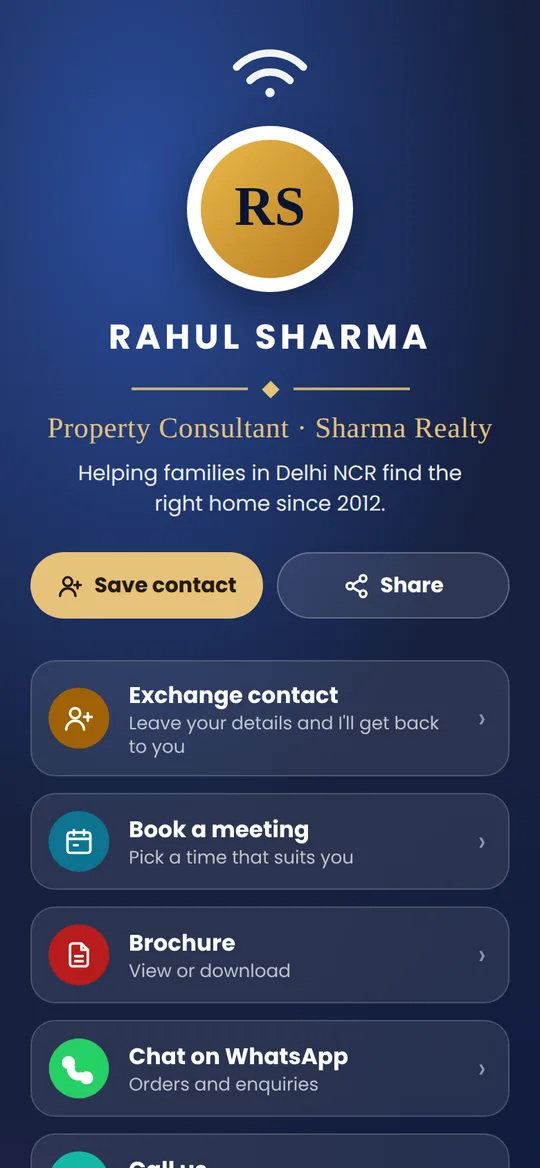
Everything a professional needs
- ◉Your photo, role and bioA round profile photo, designation, company and 2–4 lines about you.
- ⇄Exchange contactVisitors leave their name and number for you, with their consent. Download your leads as a spreadsheet file anytime.
- ▦Book a meeting and BrochureLink your Calendly or Google Calendar, and your brochure or portfolio.
- ☎Save contact, Call, WhatsApp, Email, LinkedInYour phone, email, job title and company go straight into their contacts.
- ◔InsightsTaps, button presses and leads received, with today's taps live and the full history updated every night.
- ✎Edit it yourselfChange anything with your card number and PIN. The card never needs reprinting.
Sample page shown. No app needed — for you or the people you meet.
One price. No monthly fee.
₹1,500 one time — the NFC card with QR code, your Professional page, Exchange contact and insights. Delivered across India.
Questions
Who is the Professional card for?
Individuals who meet people for work: doctors, lawyers, consultants, property agents, insurance and loan advisers, sales people, coaches and freelancers. Shops and restaurants usually choose the All-in-One card.
What does the page show?
Your round photo, name, designation, company and a short bio, then buttons for Save contact, Call, WhatsApp, Email, LinkedIn and your other links, plus Book a meeting, Brochure and Exchange contact. A Google review button is optional.
How does Exchange contact work?
A visitor taps Exchange contact, types their name and number (email and a message are optional) and agrees to share them with you. The details appear in your card's edit page, where you can download them as a spreadsheet file or delete them.
Can I see how many people tap my card?
Yes. Your edit page shows card taps, button presses, leads received and the approximate places your card was tapped, for the last 30 days.
Can I change my details later?
Yes, anytime, with your card number and PIN — photo, bio, links, brochure and meeting link. No reprint needed.
Is there a monthly fee?
No. ₹1,500 one time, including the card, your page, insights and Exchange contact.